JOB SITE CANVAS
Login Join the Beta
The Product

One canvas for every property, from first walk-through to final report.

Every inspection starts the same way in the field: walk the property, note what you find, decide what to treat. Job Site Canvas keeps all three steps on one screen: the sketch, the findings, and the report all live in the same place your tech is already standing, so nothing gets rebuilt from memory back at the office.
Join the Beta → ▶ See Features
Job Site Canvas app shown on a mobile phone at a job site

How it works

Four steps, one tool, no paperwork left behind.

Map the Property
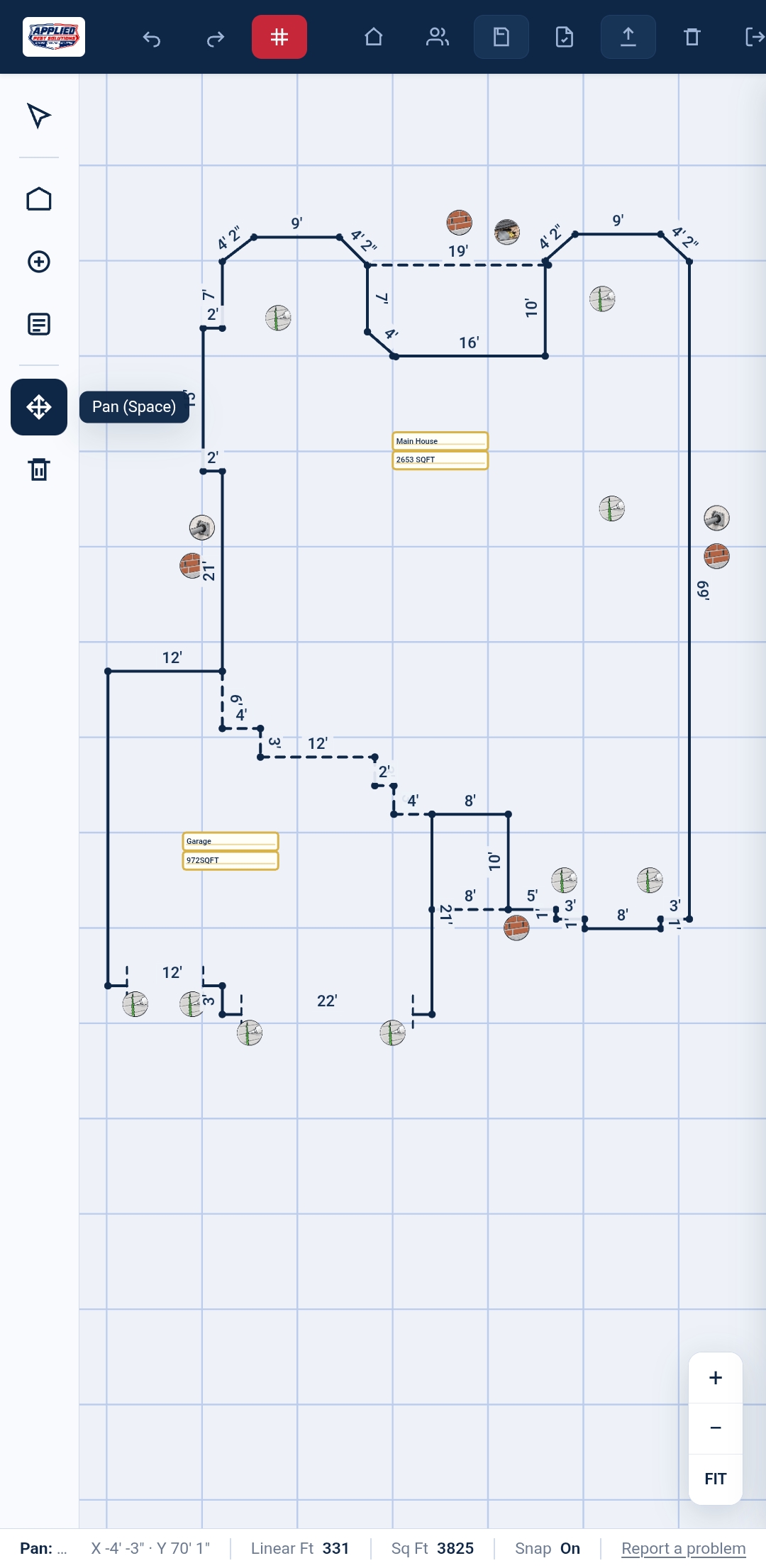
Draw the structure right on your device: walls, rooms, and layout, sketched to scale as you walk the property. Once the outline's down, drop inspection and treatment icons directly onto the plan: active infestation, moisture damage, foundation vents, termite bait stations, trench and rod treatments, wood-to-ground contact, and more, each one pinned to the exact spot you found it. The result isn't a rough diagram scribbled on a clipboard; it's a precise, to-scale property map that becomes the visual backbone of everything that follows: findings, treatments, and the final report.
Document the Work
Every finding gets pinned exactly where it happened. Tap a spot on the sketch and drop the right icon (active infestation, moisture damage, a treatment applied) right there, at the exact location on the property. Attach photos to the job as you go, so everything from that inspection (the map, the findings, the images) lives in one place instead of scattered across a camera roll you have to match up from memory back at the truck.
Build the Report
Once the sketch is marked up and the findings are logged, the report writes itself. One tap turns the property map, inspection notes, and photos into a polished, branded PDF: cover page, to-scale diagram, a legend of every icon used, inspection details, and photo pages, pulled straight from what you documented in the field. Nothing gets retyped or rebuilt back at the office. For Oklahoma termite work, the same job also generates a completed ODAFF-1, the official state form, filled automatically from your inspection data and ready to sign on-site. The sketch itself works fully offline in the field; reports generate the moment you're back online.
Offline field use
No signal, no problem. Start a brand-new job from a dead zone (sketch, photos, and all) and it queues right there on the device until you're back in range, then syncs automatically the moment you reconnect. No re-entry, no redoing work back at the office. Already-synced jobs keep working offline too: edits save locally and catch up to the platform as soon as you're connected again. Reports (the branded PDF and ODAFF-1 alike) generate once you're back online.
Professional reports. Stronger businesses.
Put your next inspection on the Canvas.
Join the Beta → Book a Demo